Calling down the lightning
Posted: January 16, 2026 Filed under: Art, Coding, Creations, DIY, Explorations, How-to, That Totally Worked | Tags: arduino, attiny, blinky, burning man, DIY, electronics, fastled, Halloween, LED, LEDs, light, lightning, MOSFETs 2 CommentsSo here was the big idea: a bunch of umbrellas with lightning in them. Like this:
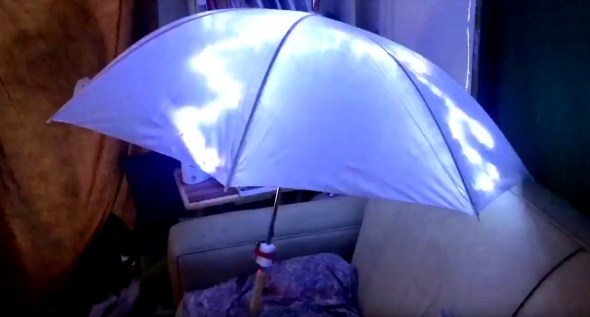
Sianna and Dean and I started brainstorming about this as an idea for an art project for Burning Man 2018, and as these things do, the idea quickly blew up from a simple idea to include all kinds of complicated and awesome details.
The original idea was something like:
- umbrellas
- plain, always-on LED strings (cool white) sewn into the umbrellas
- use the pre-wired 3xAA battery pack that comes with the LED strings
Here’s where we wound up after a bunch of brainstorming:
- umbrellas
- four independent strings of LEDs (cool white) sewn into each umbrella, so that there could be animation and motion
- microcontroller programming of the LED strings, to create the flashes and motion
- some other sort of battery setup, not just the plain 3xAA battery pack that came with each LED string
- synchronization of the whole pack of umbrellas together, so that lightning could flash across all of the umbrellas at once, or across them in some kind of fast sequence
Sianna and Dean did all the sewing of the LEDs into the umbrellas, and I did the electronics design, construction, and programming.
What follows is the story of how I arrived at the final electronics design for these “stormbrellas”. I started with an initial electronics design for each umbrella that required some kind of full Arduino board plus a custom PCB ‘shield’ with a literally a dozen discrete components on each board to drive the LED strings. Then, through some outside-the-box thinking, some semi-careful / semi-brave experimentation, and progressive refinement I wound up with a design that required a total of just three discrete components to control each umbrella — and no “Arduino” board.
I am not a big expert at this sort of electronic design project, so a great deal of this was new territory for me. I’m hoping that you find this story interesting, and that perhaps it inspires you to try something new in this area, as well.
The Naive Design
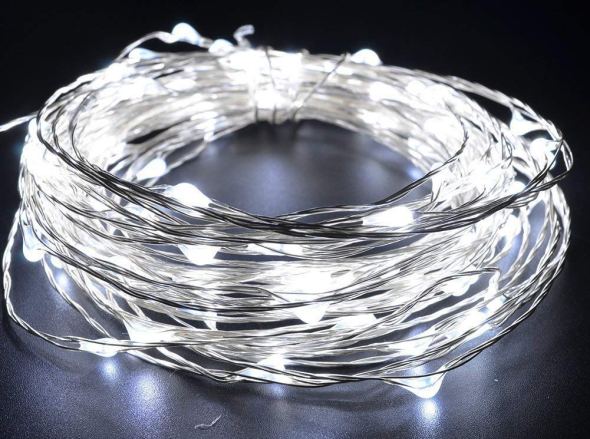
The LED strings that we were using were the kind with ‘grain-of-rice’ LEDs mounted on barely-insulated bare metal wire, like this.
I wanted to use an Arduino (of some sort) to control the strings of LEDs, because I know it pretty well, and I already had a bunch of them lying around waiting to be used in projects.
Power to the pixels
I know that you can power individual LEDs directly from the ‘output’ pins of an Arduino, by connecting the LED from the output pin, through a (very important!) current-limiting resistor, to Ground. There’s a famous sort of joke in electronics that if you omit the current-limiting resistor, the LED will try to draw more power than it can handle, and in a very short period of time it will turn from a Light-Emitting Diode into a Smoke-Emitting Diode. (See also: “light-emitting resistors”.) So you always always always need to make sure the LEDs can’t draw more power than they can handle, and the way to do that is a current-limiting resistor.
I also know that there’s a limit to how much current you can draw directly from one Arduino pin, and that you definitely cannot run a whole string of LEDs directly from an Arduino output pin. Instead, you need to use a power transistor, like a MOSFET, as a sort of a power switch. The Arduino controls the MOSFET, and the MOSFET switches the high-current power on and off to the LEDs. Each MOSFET needs a ‘pull-down resistor’ to turn it all the way off when it’s not being activated.
Of course each string of LEDs still needed a ‘current-limiting resistor’ as well. When I dissected one of the battery packs that came wired to the LED strings, I found that each one had 3xAA batteries (4.5 volts total), an on/off switch, and a 3.6 ohm current-limiting resistor, all in series with the string of LEDs. These particular LEDs seemed to want something like 3.3 volts across them. The battery pack (3xAA) produced 4.5v, and their simple design just used the small resistor to limit the current, and drop the voltage — throwing away the rest of the energy as heat. And wow did that resistor get hot!
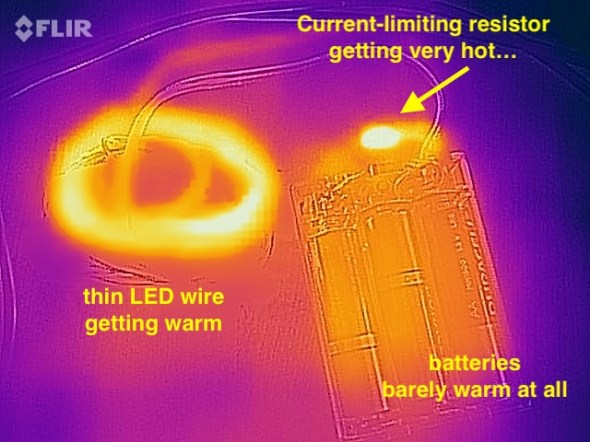
I measured the temperature of the resistor (in open air) at over 140ºF when the LEDs were lit. It was definitely keeping the LED current and voltage down, but it was throwing away a whole lot of the battery power as heat, too. I estimated that nearly 1/3rd of the energy in the batteries was being turned into heat, and only about 2/3rds of the energy was coming out as light. Anyway, clearly the current-limiting resistor was important for these LED strings.
So I figured that I’d want an Arduino board, and then for each string of LEDs, a MOSFET, a pull-down resistor, and a current-limiting resistor, arranged something like this:
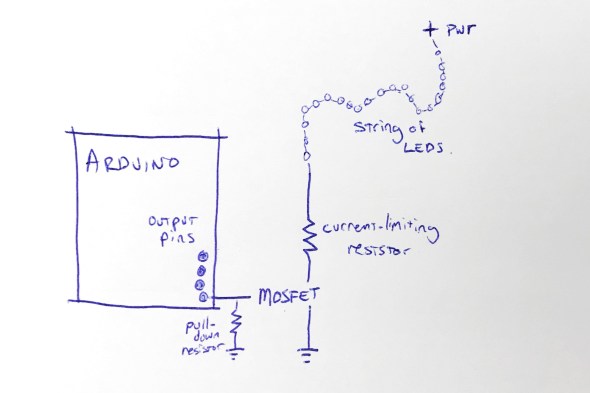
This shows the rough design for controlling one string of LEDs; to control four strings of LEDs, I’d need four MOSFETs, four pull-down resistors, and four current-limiting resistors. I figured that I’d mount all of that on some kind of Arduino ‘prototyping’ shield. Each shield would have those twelve components on it.
Call me lazy (go ahead, I’ll wait), but that seemed like a lot of parts, and a lot of work to build six umbrellas that way.
“Grandfather say ‘It never rain every day'”
I started thinking about those current-limiting resistors, and these LED strings, and about Burning Man, and about lightning itself. To simulate the look of lightning, I was not going to run these LED strings turned on all the time. In fact, they’d be turned off most of the time. I’d only need to power them up for short, bright flashes. And of course, this being Burning Man, the brighter, the better!
I also thought back to this great tech note from Cree (the superbright LED people) entitled “LED Electrical Overstress”, but which I refer to as “So You Want To Run Our LEDs Beyond Their Rated Power Limits”. http://www.cree.com/led-components/media/documents/XLamp_Elec_Overstress.pdf This tech note addresses the question “OK, so if the LED is rated for X volts, what actually happens if I run it at a voltage higher than X, but just for a short time?” And the answer they give is something like this: well, it might be a little bit brighter (but not proportionately), and it will probably also shorten the life of the LED, especially if the LED is over-volted for any significant amount of time.”
And I thought about those tiny little 3.6 ohm current-limiting resistors in the battery wired pack. I wondered if I needed them at all. Maybe I could sneak by without the current-limiting resistors — if I only pulsed the LEDs on for short flashes. And maybe, just maybe, the LEDs would flash brighter than usual, for those short flashes, if I omitted the current-limiting resistors. I decided to try it as an experiment: run the LED strings with no current-limiting resistor. Well, sort of. I say sort of because those LEDs are strung along very long, very skinny wires. And you know what a long, skinny wire acts like? Hint: a resistor.
Well, I tried running one of the LED strings for fifteen minutes solid, at full power, with no (external) current-limiting resistor and here’s what I found: the LED strings do light up a little bit brighter. The wires themselves definitely got warm, but not too hot to touch. I wouldn’t want to run them like that, full-on, for hours… but that’s not the plan. The plan is to flash them on for fractions of a second, or maybe even flicker for a couple of seconds, and then leave them off for a long stretch.
So I decided that since I was just flickering the LED strings on with (much) less than a 10% duty cycle, I could probably skip the current-limiting resistors … and get brighter flashes in return. Win-win.
And in addition to the specific component reduction (and brightness boost), this planted a seed in my head: sometimes you can go beyond the rated limits of a device, especially if you’re only doing it for a short time. Keep this in mind; it shows up again later.
Shifting away from MOSFETs
At this point the design for each umbrella is basically: Arduino + protoshield with four MOSFETS and four pull-down resistors. And of course four LED strings. I didn’t want to juggle the four separate MOSFETs, and I started wondering if there was some pre-packaged integrated circuit that basically had four MOSFETs inside it, so that I could reduce the part count from 4 MOSFETs down to one IC.
Looking around for a while, I came across the TPIC6B595, a “high power shift register”. They’re a bit like the popular 7HC595 shift register, with eight output pins, but they can drain “up to 150mA” per output pin. This might be the chip for me, I thought. But then, Hrm, I wondered, I wonder how much current I need for each LED string. I did some tests and found that each LED string could draw up to about 350mA. 350mA is far more than 150mA, so I didn’t think this chip was going work for me. On a lark, I decided to read the actual datasheet for the chip, from TI: http://www.ti.com/lit/ds/symlink/tpic6b595.pdf And look what we have here (highlighting is mine) …
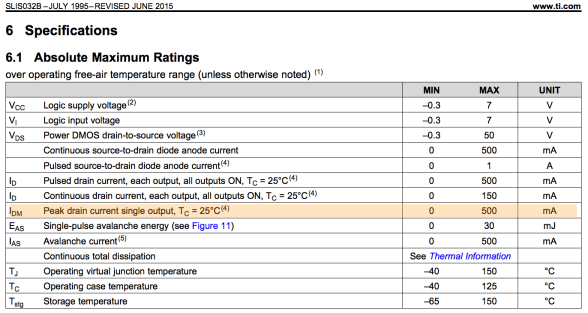
While the continuous drain current is 150mA per output pin, the peak drain current per pin is 500mA! And 500mA is greater than the 350mA that I need to flash the LED strings on for a few instants! Maybe this was the chip for me after all. I ordered one to test. Well, I actually ordered two, because electronics tend to not bounce back well from being tested with current levels above their ratings.
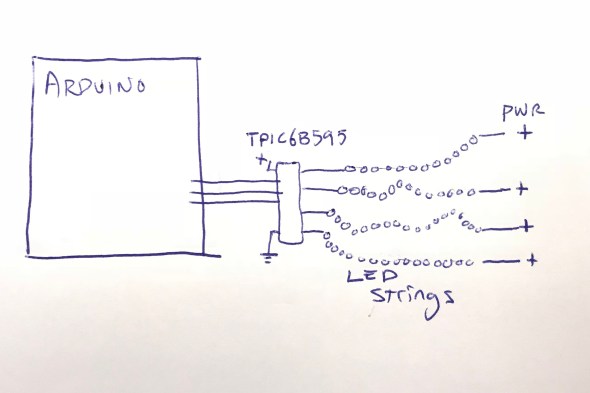
The chip arrived, and I wired it up, found some Arduino code to drive it, and lo and behold, it worked! In fact, I was able to hook up all four LED strings to the TPIC6B595 chip, and light them all up brightly (and briefly!) with no detectable overheating of the chip. I did note that the datasheet said that the whole chip could only handle one Amp (1000mA) of current. If I lit up all four LED strings at 350mA each, that would be 1400mA, more than the rated maximum current of the chip.
But again I wondered: OK, so it’s rated to handle 1000mA total. But what happens if I pulse 1400mA through it for one tenth (1/10th) of a second? Does it instantly blow up? Does it self-limit the current to 1000mA? Does it shut down and need to be powered off to reset it? Again, I decided to try it. The answer: it did not shut down, or need to be reset, or instantly blow up. In fact, it seemed perfectly happy to deliver 1400mA of current, as long as it was for short pulses, with cool-down periods between them. I decided to go forward with this, and see how far I could get. One chip, no discrete MOSFETs, and no pull-down resistors! If it worked, I liked this a lot.
Here’s where I was:
Flashdance (What A Feeling)
At this point I had a setup where I could drive all four LED strings from my Arduino code, as long as I didn’t run them all at full-blast all the time. In fact, I had to be mindful to keep the overall power level low, even if sometimes I spiked it up above the rated power level for TPIC6B595 chip, and above the standard continuous power level for the LED strings.
I spent a few hours studying ultra-slow-motion videos of lightning strikes, like this one:
After watching them over and over, I wrote and tested and refined some code that I thought created the same kind of visual impression, while also being mindful of the power envelope that I wanted to stay within. Once I had the code put together, I noticed that it was actually pretty small: compiled the code size was just about 3K, and it used less than 100 bytes of SRAM for global data. The small code and data size were hardly surprising in retrospect; in a sense, all that it did was flash four output values. I’d used FastLED’s math functions, which tend to be compact, including FastLED’s random number generator for the timing of the flashes. FastLED’s random number generator (well, pseudo-random number generator) is significantly more compact than the default Arduino random functions, which also helped reduce the code size.
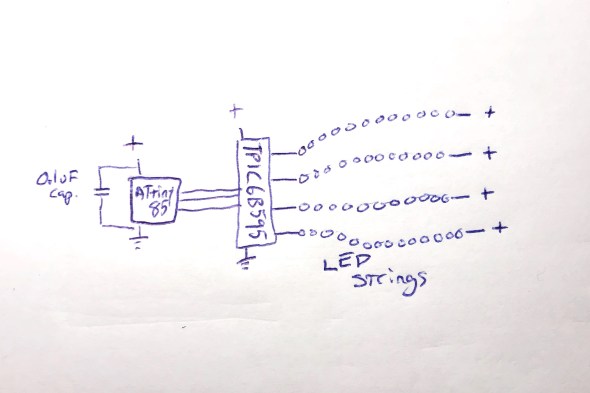
The small code size started me thinking: if I only need this tiny program, and this tiny amount of data, maybe instead of a full-blown Arduino board, I could just get away with a ‘bare’ ATtiny85 microcontroller. I knew that people did that, but I’d never done it. Luckily, there’s good documentation about how to wire up an ATtiny for programming, and good Arduino IDE support. https://github.com/SpenceKonde/ATTinyCore I decided to give this a try. I ordered a few ATtiny85s ($2.80 each) and the required (0.1uF) decoupling capacitors ($0.22 each). I used a special $15 ATtiny programmer to help simplify the programming process; I wanted to streamline the exploration of the ATtiny85 option as much as possible for myself.
When the ATtiny85s arrived, it took me a little while to get it all figured out: burning the bootloader onto the chips, and then compiling and loading my code. My original code used the Arduino SPI library to communicate with the TPIC6B595, but the ATtiny85 doesn’t have a true SPI library, so I had to adapt my code (and my head) a little bit. Also, I had written an interrupt handler routine to provide PWM dimming of the LED strips, but my code had used the TimerOne library, which is not officially supported on the ATtiny85, so I had to find an ATtiny-patched version of the library and switch to use that. https://github.com/StoykoDimitrov/TimerOne Also, due to the slower clock speed (8MHz vs standard Arduino’s 16Mhz) I had to halve the interrupt rate that I was using for my PWM support. But eventually, I got it all breadboarded up and wired and programmed, and it worked!
Here’s where I was at that point: no Arduino board, no loose MOSFETs, no pull-down resistors, no current-limiting resistors:
Everything worked great, until it didn’t
Everything worked great, even when I switched from a plug-in power supply to battery power… and then it started not working. It would start up fine, and ‘rumble’ some dim lights with no trouble, and even show the first few medium-bright lightning strikes. But on the fourth lightning strike, an extra-bright set of flashes, it would lock up. It always locked up on the fourth flash, which was always extra-bright, because the random number generator that the code used to sequence the ‘random’ flashes was, in fact, completely deterministic. Even though it might not seem that way to the casual observer, the same pattern of flashes always occurred, and the fourth one was always extra-bright, and that kept killing the microcontroller.
Based on my previous experience with battery-powered microcontroller-driven projects with lots of LEDs, I had a hunch, which turned out to be right: when the LEDs all flashed on brightly, the drain on the batteries from the bright LEDs caused an inverse voltage spike – a voltage dip. The voltage dipped too low, just for an instant, and the microcontroller locked up.
I thought about how I might isolate the microcontroller’s power from the sudden spike/dip from the LEDs flashing on full brightness. I could, of course, just reduce the maximum brightness of the LED strings, but this was a project for Burning Man, and I’m pretty sure that “reduce brightness” isn’t one of the ten principles. All I needed to do was power the microcontroller for a very short time, to bridge it across the dip caused by a very bright flash. I decided to try an experiment: I replaced the 0.1uF ‘decoupling’ capacitor ($0.22) next to the ATtiny85 with a capacitor with 10,000 times the power capacity: a 1000uF electrolytic capacitor ($1.22). My theory was that even when the LEDs spiked up in brightness, the new 1000uF capacitor would continue to provide just enough smooth power to the microcontroller it to keep running correctly. And it worked: even when bright flashes hit the LED strings, the microcontroller kept chugging along. Here’s where I was:
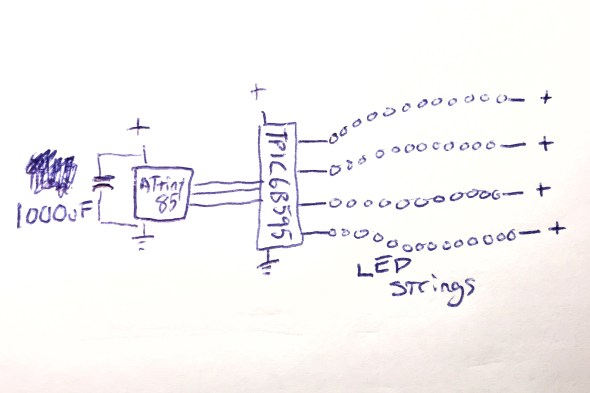
And this worked perfectly.
Now all I had to do was figure out how I was going to power this whole thing when it was mounted up inside an umbrella.
Hello Power My Old Friend
As I have written about before (see Cautionary Tales of Power), power is always a real pain in the grounding strap. Here were the choices that I was thinking about:
- 3xAA: this would be 4.5 volts on fresh batteries, and about 3.9 volts on ‘dead’ batteries. The microcontroller would probably work okay, and the LEDs would probably be okay, but I sort of felt like a 3xAA battery pack would be a little bit bulky and heavy. This was my ’emergency fallback’ plan.
- 4xAA: 6.0v on fresh batteries, 5.2v on ‘dead’ ones. I would have to use a voltage regulator, or a buck converter to drop the voltage down to the 4.5 – 5.0v range that I wanted. Plus a 4xAA battery pack would be even bulkier and heavier than the 3xAA pack above.
- Lithium Ion rechargeable battery pack: 3.7v when fully charged, 3.0v when empty. I’d probably want a boost converter to get up into the 4.5-5.0v range that I wanted. I love rechargeable batteries in general, but in the middle of the desert, there’s something to be said for being able to just eject a set of dead AAs, and drop in a fresh set. Using a lithium battery pack would make that much harder. Related options I thought about : standard 18650 cells, and also LiFePO4 cells.
- 2xAA + boost converter: this was what I really wanted to do. I wanted to use the DFRobot “AA Boost” module, which holds two AA batteries (very firmly), has a built-in on/off switch, and a boost converter which produces 5v output. It even has a “low battery” warning LED. The whole module costs $5.90 in quantity 1, and I’ve used them many times very successfully. https://www.dfrobot.com/product-991.html
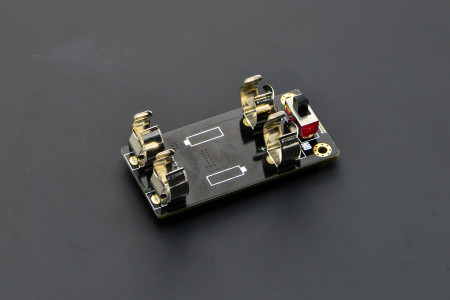
I already had some of these 2xAA+boost modules on hand, and was about ready to go forward with this plan when I spotted this in the DFRobot description. Note the current limit on the updated “V2” version of this module:
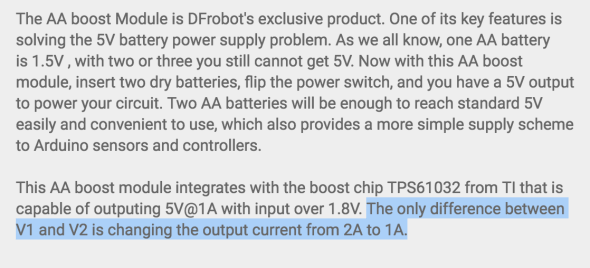
The maximum output current from this module was now just one amp. Not two, but one. One amp = 1000mA. And you may remember that the maximum power draw from the LED strings when they’re all fully lit, for a split second, is 1400mA total. And the 1400mA that we need is more than the maximum power that this module can provide.
Or… is it?
I looked up the TI TPS61032 boost chip that DFRobot uses in their boost module, and found the data sheet. http://www.ti.com/lit/ds/symlink/tps61032.pdf And while it definitely describes the chip as a “boost converter with 1000 mA current output”, look what it says in the highlighted (by me) portion of the datasheet:
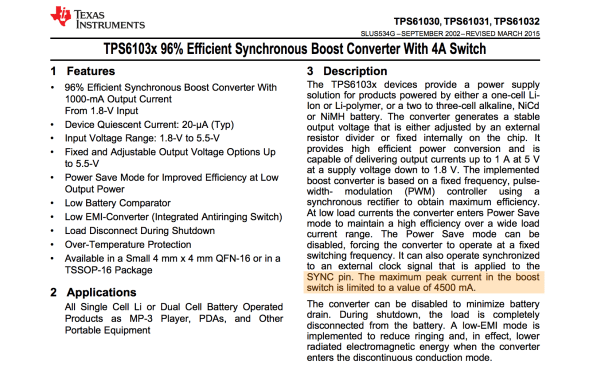
And with that datasheet in hand, I decided to do the same thing that I’d done twice before on this project: try it, and see if the components can operate over and above their advertised ‘continuous’ ratings for brief periods, with cool-down rest periods between. And the answer? Yep, short bursts above the ‘continuous’ rating seemed to work fine!
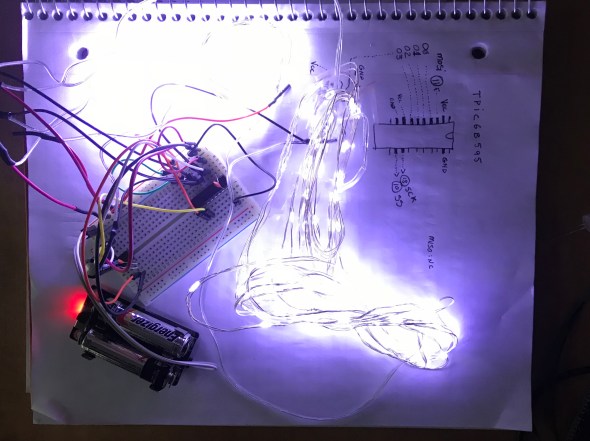
I had had a battery-life goal for the umbrellas: I wanted them to be able to run, at Burning Man, from dusk to dawn (12 hours) on one set of AA batteries. Once I had the design all wired up with the DFRobot AA boost module, I popped in a fresh set of AAs, turned it on, and went to bed. Not only was it still running the next morning, it continued to run for over 48 hours continuously, and it might have run longer, but I had to get back to work on it, so I turned it off. Next I had to figure out what I was going to do about a circuit board.
The Chairman of the Board
I’ve never designed a custom printed circuit board before by myself, and I really wanted to do that for this project. Now that the total part count for each board was down to just three (the ATtiny85, the TPIC6B595, and the 1000uF capacitor!) it seemed like a great first project for me. However, time before Burning Man was getting a little tight, and I looked around for other options that might be faster and designing a custom board, and having it manufactured for me.
Over on Tindie, I found a great little ATtiny85 Project Board for $1.75. https://www.tindie.com/products/DrAzzy/attiny85-project-board/
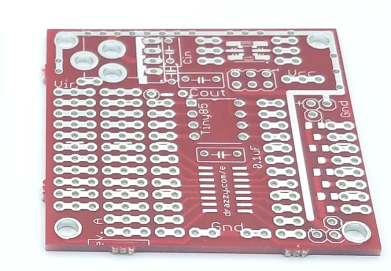
These little boards had: space for the ATtiny85, space for the 20-pin DIP TPIC6B595, and even a spot for the capacitor. I picked up some of these boards, added sockets for the DIP chips, seven jumper wires to inter-connect the two chips together correctly, attached some multiconductor connectors for the LED strings and power, and poof! Just look at that neat, tidy little red board there!
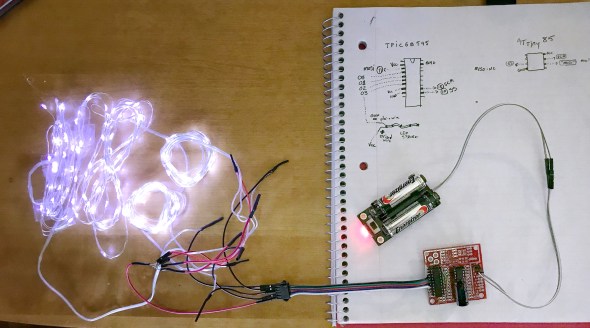
With all this ready to go, Sianna, Dean, and I worked out how we wanted the LED strings attached to the five-pin connectors. Sianna and Dean worked madly and mightily sewing the lights into the umbrellas, while I went into production mode, and made five more complete sets of boards and battery packs. If we’d been making more than six boards, I would have done a custom PCB for sure. Getting all those jumper wires right was my least favorite part of this project, but eventually it started going faster, and then they were all done!
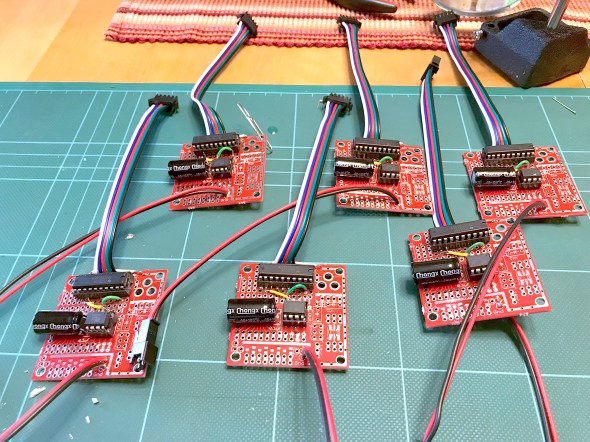
To this day, I’m still pretty proud of the three-component controller boards, and the development path that got me here.
Putting it all together
Sianna and Dean did a tremendous amount of work sewing all the LED strings into six large white umbrellas. When the first one was all put together, it was time for the first visual test. Full disclosure here: the umbrellas do not make thunder noises; the thunder noises in the following two video clips were ‘added in post’. We had thought about what it would take to make really good thunder noises, and the short answer was: a really big power supply (read: a heavy battery) and a really big (read: heavy) speaker — neither of which was going to integrate well with a umbrella intended to be carried in one hand. So: no audio. You just have to imagine the thunder noises, or, in this case, you can listen to the ones I dubbed into the video.
So here was Stormbrella #1, sitting on the couch.
And then came the whole collection, Stormbrellas #1 through #6, scattered across the living room.
For reasons of time and technology, the six of them are not wirelessly synchronized with each other, but other than that, these were just what we hoped. Sianna and Dean took a bunch of them out to Burning Man, where the umbrellas flashed their lightning, and fought mightily with the high winds in the Black Rock desert. Some of the stormbrellas even lived to return home and tell the tale of their adventures, and their victory.
Epilogue: A Halloween Thunderstorm
For Halloween, the kiddo and I always liked to decorate the front yard of our house with a big theme, like turning the house into a castle, or a discotheque, or an aquarium. And that year, we made the front yard into a thunderstorm. We set up a big sound system to play thunder, programmed flash strobes to light up the front of the whole house, and all of the stormbrellas on stands, giving lightning and umbrella vibes at the same time. Also I put a sprinkler on top of the house so that it was actually raining the tiniest bit, completely with a baffle to keep the actual front walkway up to the house — and the trick-or-treaters — dry. The overall immersive effect was great, and the stormbrellas rode again!
I still have the stormbrellas, and sometimes when it’s a rainy night out, I carry one of them as I walk, happy and dry underneath as the lightning I made flashes overhead.
Making “Sun’mores” at 100ºF
Posted: June 25, 2025 Filed under: Creations, Explorations, Food, How-to, That Totally Worked Leave a commentYesterday the temperature in Boston, at Logan Airport out by the water, hit a new record of 102ºF (39ºC). The temperature outside my window in Somerville was 105ºF (41ºC), and I said “It’s so hot that you could make s’mores by just stacking the ingredients outdoors.” Ness said “you should try it! it seems like a you thing to do”, and they were right and I bet you can already see where this is going.
I stacked some chocolate and some marshmallows on graham crackers, arranged it all on a baking sheet, and put it outside on my porch deck. It was 3:46PM, and the sun was already well past its highest point, but the air itself was scorching and the chocolate started melting immediately.


I had to move the tray from the front of the house to the back to keep it in direct sunlight. At the same time, I decided to try an experiment: putting a glass ‘greenhouse’ dome over some of the marshmallows to see if it helped them melt. For that I used pint glasses, which coincidentally (I presume) are almost exactly the right size for a standard graham cracker.
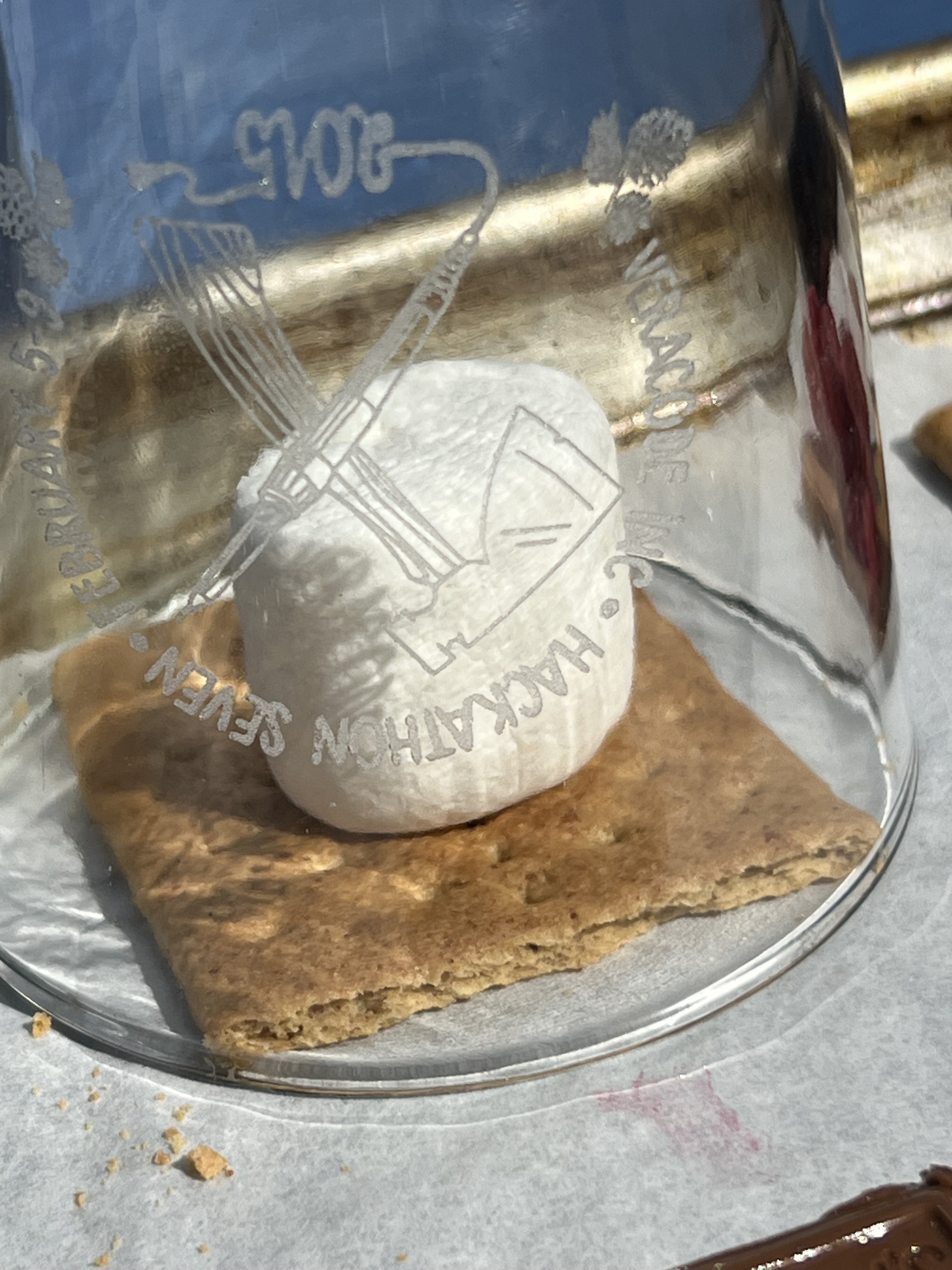
Now things were really heating up. The air temperature was 104ºF (41ºC), but the chocolate’s dark surface had allowed it to absorb more of the sun’s energy, and I measured its temperature as 159ºF (71ºC)!
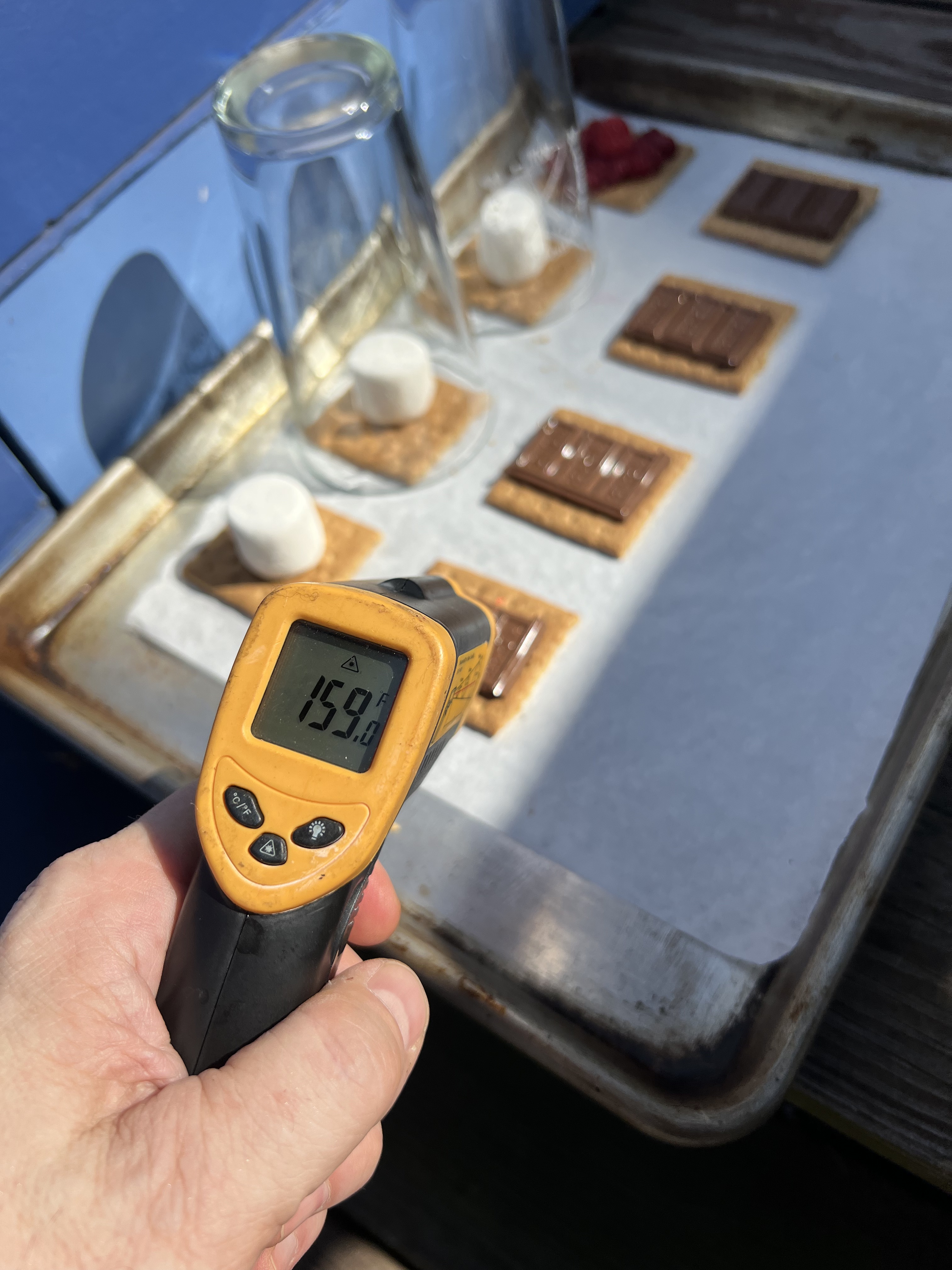
In addition to the traditional graham+chocolate+marshmallow combination, Molly set up a fruit combination: graham+chocolate+raspberries, which you can also see in the first photo above.
The ingredients had now been outside for just exactly one hour, the sun was starting to get lower in the sky, and even though I was only running outside for quick checks on the ingredients, I was getting overheated and it was time to move on.

Time to assemble the final product! But: would the chocolate really be entirely melty? Would the marshmallows really be gooey all the way through? And would the greenhouses have made any difference? It was time to find out.
Although the marshmallows hadn’t deformed just sitting there, they were really quite gooey, and the greenhoused marshmallows were, in fact, even softer and gooier! Assembling the final sandwiches was easy, and everything melted and mixed and blended, just like campfire s‘mores.



I bought the (very hot!) baking sheet indoors, where Molly, Sarah, I, and a couple of area teens did some long-awaited taste-testing. It worked! We had tested my hypothesis that you could make s’mores just by putting the ingredients outdoors on a 100ºF day, and found that you can, and should! If we had started closer to solar noon, and if we’d put a greenhouse over all the ingredients (perhaps a glass 9×13 baking pan, upside down?) I think they would have gone much faster, perhaps in 20-30 minutes.
The fruit combination, raspberry+chocolate+graham was particularly delicious, and felt extra summery. Molly suggested next time doing fruit+cheese, and Sarah joined in to say that if we did that next time, that we should put it on something better than a graham cracker.
After some back and forth, we officially named these “sun‘mores“, and decreed that they can only truly be created on days when the temperature hits 100ºF, which it certainly did yesterday!

And when Ness saw all this they exclaimed simply, ”by jove!!!”

82°
Posted: June 1, 2018 Filed under: Art, Coding, Creations, Explorations, How-to, That Totally Worked Leave a commentThis is a 100% recycled yak fur story.
Molly asked me a thoughtful question while I was in the middle of something else and I said “Just a second, I need to rotate my brain.” A moment later, I said OK and she asked me if my brain was all rotated now. I replied, “Well, 82° out of 90°, close enough.” Molly quipped “And since when did you ever do things square?”
But then I nerdsniped myself. I started to wonder about 82° angles. If a polygon with 90° angles is a square, what sort of polygon do you get if you turn 82° at each corner? It’s not one of your basic shapes, because:
- 120° angles make a triangle (3 sides, since 360° ÷ 120° = exactly 3)
- 90º angles make a square (4 sides; 360° ÷ 90° = exactly 4)
- 82° angles make a ??? (?? sides; 360° ÷ 82° = 4.3902439024???)
- 72° angles make a pentagon (5 sides; 360° ÷ 72° = exactly 5)
It must be some kind of … star shape, 82 doesn’t go evenly into 360, which means that you’d have to spirograph-around the circle more than once to come back to where you started.
But what kind of star? How many points would there be on a star with 82° angles at each point? I decided that I had to know, and that I wanted to see what the star looked like, not just find out the numeric answer. The numeric answer is the GCD of 82 and 360, and I could figure that out, but then where’s my picture of the star? I decided to write a quick program to draw stars with angles of ‘N’ degrees at each corner, and to print out how many points there were on the star.
And what’s a quick way to write a program to draw connected lines at various angles? With Logo and turtle graphics, naturally. Luckily, I’ve already done some programming in Logo. Unluckily, it was back in the 1980s. But it’s like riding an (imaginary) bicycle, right? I was sure I could remember and pick it up again quickly. I also (correctly) guessed that there were probably Logo interpreters that ran in a web browser using Javascript. I chose this one, because it had handy examples and Logo language reference documentation built in: http://www.calormen.com/jslogo/
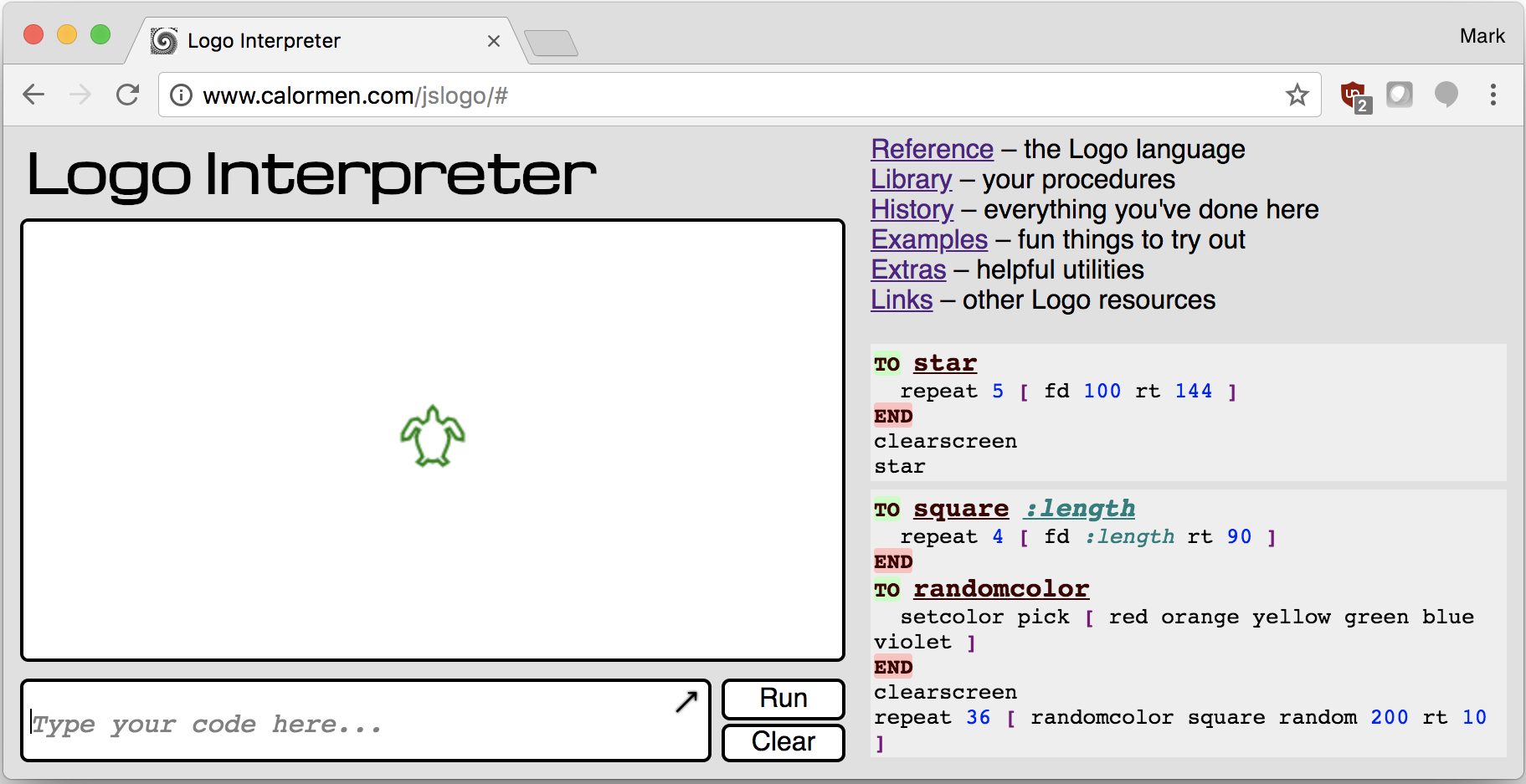
So ten minutes later, I had refreshed my Logo skills. Luckily, Logo is secretly sort of a dialect of LISP, and I’m very comfortable with LISP-like languages. Here’s the code I finally came up with:
to anglestar :angle
  clearscreen
  penup
  forward 150
  pendown

  make "count 1
  setheading :angle

  while (heading > 0) [
    forward 200
    right :angle
    setheading round modulo heading 360
    make "count sum :count 1
  ]
  forward 200
  show :count
end

anglestar 82
Now experienced, professional Logo authors will notice that there’s a ’round’ in there. Why is that? If all these numbers are integers, why do I need to ’round’ the numbers at all? Well, I didn’t have it in there at first, and the program wasn’t stopping. At all. It’s because this particular implementation of Logo, in Javascript, uses Javascript floating point numbers for Logo numbers, and since “modulo” is a floating point division-remainder operation in Javascript, sometimes instead of coming back with an answer like 377 modulo 360 = 17, it was really doing something like 377.0 modulo 360.0, and coming back with an answer like 17.000001, because floating point math is way more complicated and hard that you might think. So after having this problem, and fixing it by inserting a ’round’ into the heading math, everything worked better. Here’s the output from N=82°
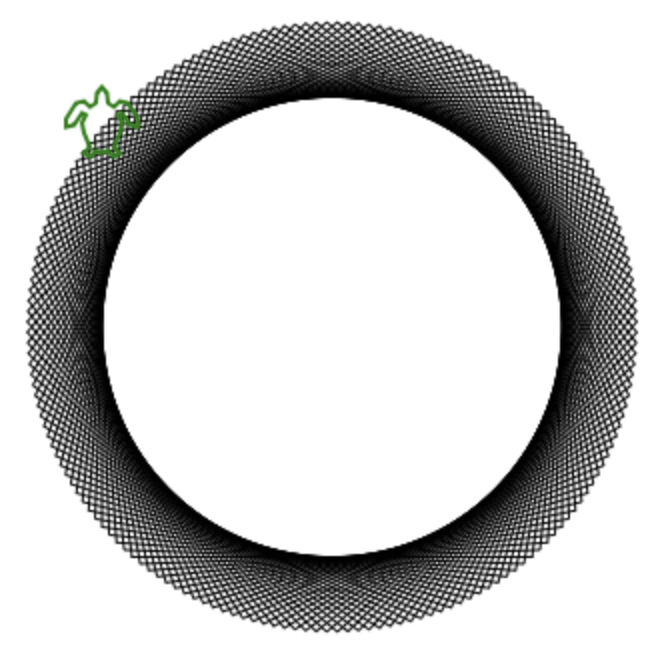
And it printed “180”, meaning that this is a 180-point star. Or, as Molly pointed out, more of a bike wheel than a star really. An imaginary bike wheel.
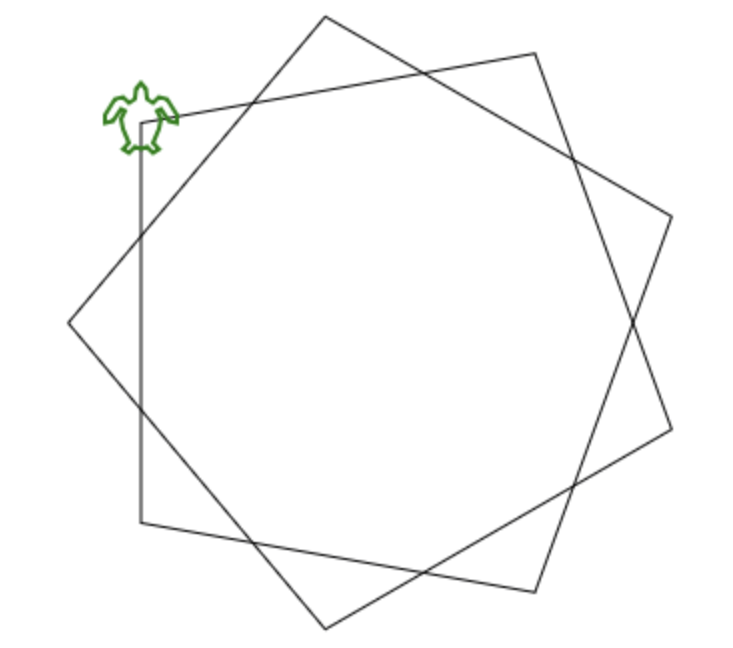
I decided to try other angles since I now had this great program. With N=80°, you get a nine-pointed star, because 80° x 9 = 720°, which is twice around the 360° circle:
And with N=81° you get a 40-pointed star:
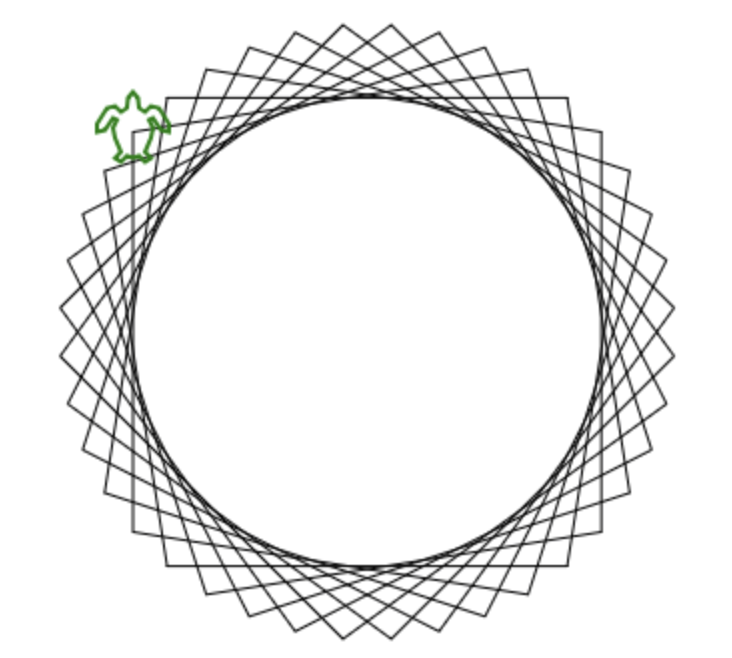
Although as Molly pointed out, this one isn’t really a ‘star’, either. This one is more of an imaginary bicycle gear, a lot like this real 40-toothed bicycle gear:

So anyway, the answer to the original question, “How many points are there on a ‘star’ whose lines meet at 82° angles?” is …. 180. (And yes, the GCD of 82 and 360 is, in fact, 180!) But to figure it out my way, I had to refresh my 35-year-stale Logo skills, debug and code around a Javascript floating point math issue, and now the floor is totally, completely covered in yak fur.
Oh, and after all this, Molly very patiently re-asked me her original question again, and I answered her without yak-further delay.
Cautionary Tales of Power
Posted: November 27, 2015 Filed under: Coding, Creations, DIY, Explorations, Getting A Clue, How-to, Pearls of Folksy Wisdom, So that didn't work | Tags: arduino, blinky, DIY, fastled, fire, glow, glowy, LED, LEDs, light, power 3 CommentsWhen doing an LED electronics project, there seem to be three big “P”s that have to be tackled:
1. Pixels (which ones, how many, what configuration?),
2. Programming (what do I want, and how can I do that?), and
3. Power (how much, from where, and how do I distribute it?)
And people (by which I mean: perpetual newbies like me) tend to do them in that order: first wire up some pixels, then program them, then figure out how to power it all for real.
And of course, this often leads to a problem where you get stuck between steps 2 and 3, where you have your creation sort of up and running on the lab bench — but now there’s this little problem of how to power it, and you have to go back and rethink and rework other parts of the project to accommodate the power situation. So it’s worth planning for power from the start — which is easy to say, but hard to do!
What could possibly go wrong? (A list)
So what happens if you don’t plan for power? Well, here are some power problems that I have personally had. How many of these can you diagnose just from the description? (“Failure to plan” is a nice catch-all phrase here if you get stuck.)
- Hrm, now how do I get power all the way up there?
- Gee, that’s a long run of wire… but if I use fat wire, it’ll be expensive and heavy and cumbersome. Nah…
- I’ll use skinny wire, it’s much cheaper… Hey, why is it only reading 4v at the far end? And does anyone smell something burning?
- OK, I switched to thicker wire, and I’ll just re-use the power connectors from before. Holy cow now the connectors are getting hot!
- Fine, I’ll switch to these big thick nonpolarized connectors. Huh, that’s odd, it’s not working now. Does anyone smell something burning?
- For this other wearable project, I’ll use a simple battery holder and regular alkaline batteries… hey… why are the colors so ‘warm’.. no blue? And now no green, too…
- OK, switching power to one of those ’emergency phone chargers’ that takes AAs and puts out 5v from a USB socket. Hey! Why are the batteries dying so fast?
- OK, fine, I’ll switch to this lithium battery pack… hey, it said 5000mAh… so why did it stop powering my 5000ma project after only half an hour?
- How come my WS2811 project works fine from my computer, but then flickers like crazy when I power it from this cheap USB wall power adapter?
- For this big outdoor project, I’ll use this big, burly 12V lead-acid marine battery. Hey… how come it won’t hold a full charge after the first time I let the lights go all night?
- Everything was working fine yesterday, before last night’s rain!
- Everything was working fine yesterday in the cold and snow, so it should be working fine today now that it’s warming up, right?!
- I think I’m going to switch microcontrollers. The old one had a power regulator that could handle 12v input. Hey… do you smell something burning?
- Why is this power switch getting hot now? And why is it now totally stuck in the “on” position? And … do you smell something burning… again?
So: Plan For Power.
The lesson to learn here is that for basically any real project, calculate and plan the power first. Before you wire up any pixels. Before you write any code. Just stop for a minute and think about how much power you’re going to need, and where it has to come from, and where it has to go.
Use on-line calculators that will help you figure out how much power you’re going to need, and what gauge wire you’ll have to use given how long your cable runs are going to be. I also really like the “LEDstimator” app for iOS to help explore some “what-if” values for things like wire gauge. https://itunes.apple.com/us/app/ledstimator/id945794010?mt=8
And above all else… uh… wait… do you smell something burning?
Lanyard-mountable LED throwies
Posted: May 25, 2014 Filed under: DIY, Explorations, How-to, That Totally Worked, Uncategorized | Tags: blinky, DIY, glow, glowy, invention, inventions, LED, LEDs, light, throwies, toys Leave a commentAt the last “HacKidThon”, we showed a passel of kids how to make LED “throwies”. Each one is a nothing more than an LED, a coin cell battery, and a magnet so the contraption can stick to metal surfaces, walls and buildings, and hang there glowing.
This week, someone asked me if we could modify the classic design somehow so that the LEDs could be attached to lanyards, instead of magnets. We wanted it to be as cheap and easy as the rest of the “throwie” recipe.
A little brainstorming with Eleanor, and we came up with this: plastic-coated paperclips!
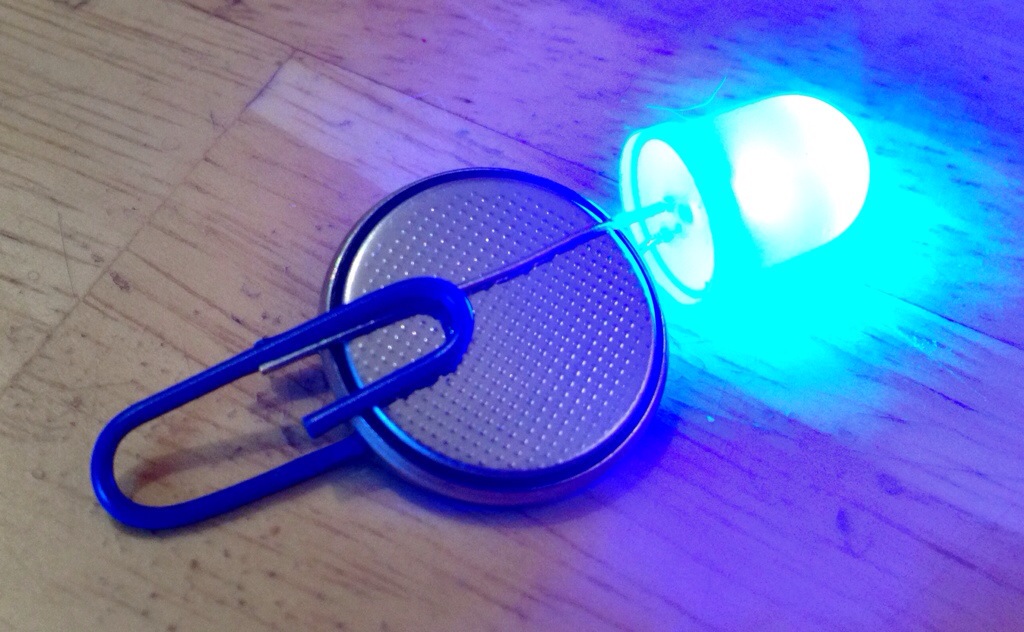
The paperclips actually help hold the LED leads in place; we put tape around them as usual, though that’s not shown in the picture. The plastic coating keeps the paperclip from shorting out the positive and negative battery terminals.
The coated paperclips cost less than a penny apiece, and come in colors that match the LEDs. Victory!
Fire2012: an open source fire simulation for Arduino and LEDs
Posted: April 4, 2014 Filed under: Art, Coding, Creations, DIY, Explorations, How-to, That Totally Worked | Tags: arduino, art, blinky, DIY, fastled, fiery, fire, glow, glowy, LED, LEDs, light 3 CommentsI’ve built and programmed a couple of different ‘fire’ simulations for Arduino and LEDs, and I’ve had numerous requests over the years to share the source code. I’ve always been happy to share my work; the holdup has been that before I share my code for the world to peer at, I like to clean it up a little. I like to give the code a clean shave and scrub under its fingernails before it steps out onto the wide open Internet where it might have an audience with Her Royal Majesty, The Queen of England. It could happen.
Anyway, I finally cleaned up the code for one of my simplest and most legible ‘fire’ simulations, and I give it to you, your Majesty, and everyone else, too. Here’s a video of the code in action on a 30-pixel strip of WS2812B LEDs (or maybe WS2811) and an Arduino. Source code link is below the video.
Full source code is here: http://pastebin.com/xYEpxqgq The simulation itself is only about 25 or 30 lines of code. It uses our (open source) FastLED library to drive the LEDs.
Discussion about the code and how to port it and use it are here on the FastLED discussion group on G+ https://plus.google.com/112916219338292742137/posts/BZhXE4cqEN4
Enjoy!
-Mark
Running 2 Amps of LEDs through an Arduino Nano
Posted: February 25, 2014 Filed under: Coding, DIY, How-to, That Totally Worked | Tags: amps, arduino, blinky, fastled, hack, hacks, LED, LEDs, nano, power, USB 2 CommentsThe Arduino Nano provides up to 0.5 Amps of regulated +5v output, on it’s “+5V” pin, which can drive between 10-30 addressable LEDs, depending on your chosen brightness and animation patterns. Even if you connect a 2 Amp USB power supply (e.g. an iPad charger), the Nano’s little voltage regulator will overheat if you try to draw more than 0.5 Amps from the “+5V” pin on the Arduino.
However, you can ‘tap’ the pre-voltage-regulator power traces on the Nano’s circuit board, and drive 2 Amps of LEDs (over 100) ‘through’ the Nano, and do it in a way that keeps your wiring simple. Basically, you can find the places on the Nano’s board where the raw USB power connections are exposed, and tap into them there.
WARNING!
MODIFY, MISUSE, AND DESTROY YOUR ARDUINO AT YOUR OWN RISK!
DANGER! FIRE! RUN!
But, OK, if you wish to continue…
1. Flip the Nano over so you’re looking at the bottom side.

2. The unfiltered, unregulated +5 signal from the USB port is available on the board near the base of the D2 pin. Carefully solder a wire (red, for +5v) directly to the exposed component pin on the circuit board.
3. A convenient companion GND connection can found on the center pin of the power regulator itself. Solder a wire (black, for ground) to this pin.
4. By powering your LEDs from these direct-power traces (and thus directly from the USB power source), instead of through the Nano’s half-amp-max voltage regulator, you can drive up to about two Amps worth of LEDs, provided that you plug the Nano into a 2 Amp USB power adapter.
I’ve used this technique in probably six or eight Arduino Nano projects, and nothing’s caught fire (yet). With a little probing around, you can also find similar ‘hacks’ for other models of Arduino, e.g., the Uno, Leonardo, etc., but since power is handled differently on each board, you’ll have to figure it out differently for each board design.
Good luck!
Hoop skirt — made with real hoops!
Posted: October 15, 2013 Filed under: Art, Creations, DIY, Explorations, How-to, That Totally Worked | Tags: costume, costuming, dress, duct tape, eak, eleanor, hoop, hoop skirt, hula hoops, skirt Leave a commentEleanor and I spent this weekend working on her Halloween costume. Part of what she planned was a ‘hoop skirt’, but as you can imagine no commercially available hoop skirt met her exacting standards of design and quality — and also my exacting budgetary requirements. Naturally, we decided to take the DIY route! And, we pondered, what goes into a hoop skirt? HOOPS, obviously!
We picked up a used dress at The Garment District (our local vintage/costume/cheapo clothing mecca), a set of three hula-hoops, and some leopard-print duct tape. The smallest hula hoop became the bottom (largest) hoop for the skirt; the other two had to be dramatically resized smaller (via pliers, dremel, duct tape). We started construction from the waist down, with a nylon web belt with a parachute snap buckle. From there, we hung each hoop with repositionable blue painters tape, and balanced each one until it was level. Then Eleanor secured each hoop in place at the right height with duct tape.
And presto! A hoop skirt made with real hoops! (and duct tape, of course!)

Travel Tips for Venturing OUT of Black Rock City
Posted: September 3, 2012 Filed under: Explorations, How-to, Pearls of Folksy Wisdom | Tags: black rock city, burning man, clothes, clothing, default world, exit greeters, fire, money, travel, wall country 2 CommentsSo! You’ve decided to take a trip away from Black Rock City! Here are some tips to keep in mind when traveling away from Home:
Clothing: Make sure to bring enough clothes so that everyone in your group can have some. Among other things, will save you all time later since you won’t have to keep switching.

Money: Do you remember when you were a child, collecting bits of money here and there, slowly saving up for that one thing you really wanted? Well, money here works the same way, except that you may have to break open your piggy bank a little bit more often. If it helps, think of every shop, store, restaurant, gas station, bar, and mall that you see as if they were “Arctica”, and what they’re all selling is basically just ice: cool, and maybe useful, but ultimately fleeting and ephemeral. ‘Nuff said.


Bacon: BACON IS EXACTLY THE SAME EVERYWHERE, THANK $%!*&@# GOD.
Returning Home After Your Trip: After you’ve had an exciting jaunt out and about, it’s always good to come back Home, to be with your family and your loved ones. Have a wonderful trip, and we’ll see you when you get Home again.

Yours in flame-
-Mark
Boost your air conditioner’s cooling power by blocking “heat leaks”
Posted: July 15, 2012 Filed under: How-to | Tags: AC, air conditioner, air conditioning, BTU, BTUs, cooling, heat, power, summer, Watts 4 CommentsA basic “5,000 BTU” air conditioner can pump about 1,500 Watts of heat out of a room every hour. To get more bang for your A/C buck, find the big ‘heat leaks’ in your room — and block them.
Your air conditioner is a pump, and what it pumps is an invisible liquid called ‘heat’. (OK, not really, but this is a useful way to think about it.) Your A/C unit scoops up the ‘heat liquid’ from inside the room, pumps it out through the window, and dumps it outside. As the ‘heat liquid’ is slowly drained out of your room, the room gets cooler, you get happier, and civilized indoor life can continue.
To boost the cooling power of your A/C unit, find out what’s letting heat leak into your room, and you block the leaks. If your room is constantly filling up with ‘heat liquid’, the pump (A/C) spends a lot more energy just keeping up with the leaks, and less energy dropping the temperature for you. Luckily, there are (at least!) three easy things you can do:
- Block the daytime sunlight. Sun flooding in through the windows also brings a flood of heat into the room. Close the blinds, pull the drapes. Congratulations, you’ve just closed a big, gaping hole that was pouring heat in to the room.
- Turn off every light you can — and replace others with LED or CFL bulbs. If you’re running three 60-Watt lightbulbs in the same room as a basic 5,000 BTU window A/C unit, you’re using 12% of your A/C’s cooling power just to pump out the heat that the lightbulbs are bringing in! Turn off the ones you don’t need, and replace the others with modern high-efficiency LED or CFL bulbs. Good job: you’ve just blocked another source of heat sneaking in.
- Unplug those electronic gizmos — or at least move the chargers to another room. Nearly everything plugged into a wall socket is leaking heat into your room. Put your hand on each ‘wall wart’ transformer, and if any of them feel warm, you’ve found another leak through which heat is sneaking into your room! When you unplug the gizmo, you plug another heat leak.
It’s common to find 20% or more of an A/C unit’s cooling power being used up needlessly, pumping out heat that you can easily block before it gets in. Block that heat before it gets in, and presto: 20% boost in A/C cooling power.
 blog.kriegsman.org