Calling down the lightning
Posted: January 16, 2026 Filed under: Art, Coding, Creations, DIY, Explorations, How-to, That Totally Worked | Tags: arduino, attiny, blinky, burning man, DIY, electronics, fastled, Halloween, LED, LEDs, light, lightning, MOSFETs 2 CommentsSo here was the big idea: a bunch of umbrellas with lightning in them. Like this:
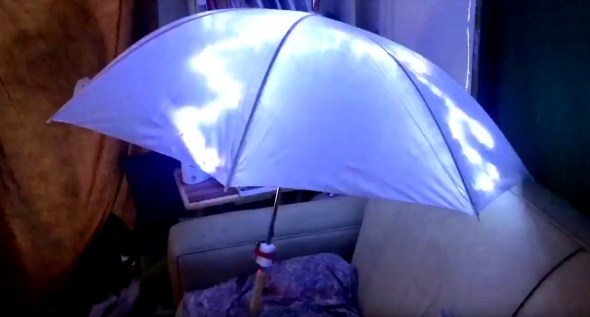
Sianna and Dean and I started brainstorming about this as an idea for an art project for Burning Man 2018, and as these things do, the idea quickly blew up from a simple idea to include all kinds of complicated and awesome details.
The original idea was something like:
- umbrellas
- plain, always-on LED strings (cool white) sewn into the umbrellas
- use the pre-wired 3xAA battery pack that comes with the LED strings
Here’s where we wound up after a bunch of brainstorming:
- umbrellas
- four independent strings of LEDs (cool white) sewn into each umbrella, so that there could be animation and motion
- microcontroller programming of the LED strings, to create the flashes and motion
- some other sort of battery setup, not just the plain 3xAA battery pack that came with each LED string
- synchronization of the whole pack of umbrellas together, so that lightning could flash across all of the umbrellas at once, or across them in some kind of fast sequence
Sianna and Dean did all the sewing of the LEDs into the umbrellas, and I did the electronics design, construction, and programming.
What follows is the story of how I arrived at the final electronics design for these “stormbrellas”. I started with an initial electronics design for each umbrella that required some kind of full Arduino board plus a custom PCB ‘shield’ with a literally a dozen discrete components on each board to drive the LED strings. Then, through some outside-the-box thinking, some semi-careful / semi-brave experimentation, and progressive refinement I wound up with a design that required a total of just three discrete components to control each umbrella — and no “Arduino” board.
I am not a big expert at this sort of electronic design project, so a great deal of this was new territory for me. I’m hoping that you find this story interesting, and that perhaps it inspires you to try something new in this area, as well.
The Naive Design
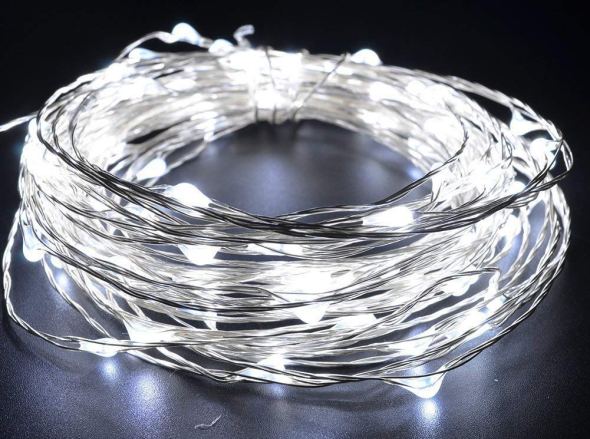
The LED strings that we were using were the kind with ‘grain-of-rice’ LEDs mounted on barely-insulated bare metal wire, like this.
I wanted to use an Arduino (of some sort) to control the strings of LEDs, because I know it pretty well, and I already had a bunch of them lying around waiting to be used in projects.
Power to the pixels
I know that you can power individual LEDs directly from the ‘output’ pins of an Arduino, by connecting the LED from the output pin, through a (very important!) current-limiting resistor, to Ground. There’s a famous sort of joke in electronics that if you omit the current-limiting resistor, the LED will try to draw more power than it can handle, and in a very short period of time it will turn from a Light-Emitting Diode into a Smoke-Emitting Diode. (See also: “light-emitting resistors”.) So you always always always need to make sure the LEDs can’t draw more power than they can handle, and the way to do that is a current-limiting resistor.
I also know that there’s a limit to how much current you can draw directly from one Arduino pin, and that you definitely cannot run a whole string of LEDs directly from an Arduino output pin. Instead, you need to use a power transistor, like a MOSFET, as a sort of a power switch. The Arduino controls the MOSFET, and the MOSFET switches the high-current power on and off to the LEDs. Each MOSFET needs a ‘pull-down resistor’ to turn it all the way off when it’s not being activated.
Of course each string of LEDs still needed a ‘current-limiting resistor’ as well. When I dissected one of the battery packs that came wired to the LED strings, I found that each one had 3xAA batteries (4.5 volts total), an on/off switch, and a 3.6 ohm current-limiting resistor, all in series with the string of LEDs. These particular LEDs seemed to want something like 3.3 volts across them. The battery pack (3xAA) produced 4.5v, and their simple design just used the small resistor to limit the current, and drop the voltage — throwing away the rest of the energy as heat. And wow did that resistor get hot!
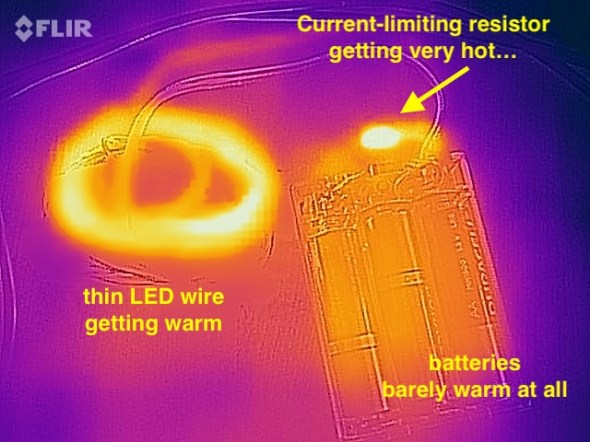
I measured the temperature of the resistor (in open air) at over 140ºF when the LEDs were lit. It was definitely keeping the LED current and voltage down, but it was throwing away a whole lot of the battery power as heat, too. I estimated that nearly 1/3rd of the energy in the batteries was being turned into heat, and only about 2/3rds of the energy was coming out as light. Anyway, clearly the current-limiting resistor was important for these LED strings.
So I figured that I’d want an Arduino board, and then for each string of LEDs, a MOSFET, a pull-down resistor, and a current-limiting resistor, arranged something like this:
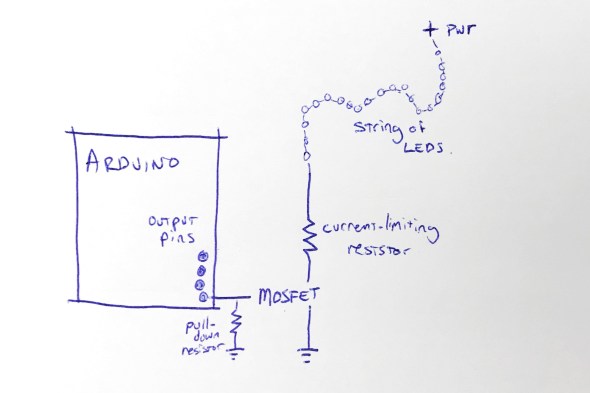
This shows the rough design for controlling one string of LEDs; to control four strings of LEDs, I’d need four MOSFETs, four pull-down resistors, and four current-limiting resistors. I figured that I’d mount all of that on some kind of Arduino ‘prototyping’ shield. Each shield would have those twelve components on it.
Call me lazy (go ahead, I’ll wait), but that seemed like a lot of parts, and a lot of work to build six umbrellas that way.
“Grandfather say ‘It never rain every day'”
I started thinking about those current-limiting resistors, and these LED strings, and about Burning Man, and about lightning itself. To simulate the look of lightning, I was not going to run these LED strings turned on all the time. In fact, they’d be turned off most of the time. I’d only need to power them up for short, bright flashes. And of course, this being Burning Man, the brighter, the better!
I also thought back to this great tech note from Cree (the superbright LED people) entitled “LED Electrical Overstress”, but which I refer to as “So You Want To Run Our LEDs Beyond Their Rated Power Limits”. http://www.cree.com/led-components/media/documents/XLamp_Elec_Overstress.pdf This tech note addresses the question “OK, so if the LED is rated for X volts, what actually happens if I run it at a voltage higher than X, but just for a short time?” And the answer they give is something like this: well, it might be a little bit brighter (but not proportionately), and it will probably also shorten the life of the LED, especially if the LED is over-volted for any significant amount of time.”
And I thought about those tiny little 3.6 ohm current-limiting resistors in the battery wired pack. I wondered if I needed them at all. Maybe I could sneak by without the current-limiting resistors — if I only pulsed the LEDs on for short flashes. And maybe, just maybe, the LEDs would flash brighter than usual, for those short flashes, if I omitted the current-limiting resistors. I decided to try it as an experiment: run the LED strings with no current-limiting resistor. Well, sort of. I say sort of because those LEDs are strung along very long, very skinny wires. And you know what a long, skinny wire acts like? Hint: a resistor.
Well, I tried running one of the LED strings for fifteen minutes solid, at full power, with no (external) current-limiting resistor and here’s what I found: the LED strings do light up a little bit brighter. The wires themselves definitely got warm, but not too hot to touch. I wouldn’t want to run them like that, full-on, for hours… but that’s not the plan. The plan is to flash them on for fractions of a second, or maybe even flicker for a couple of seconds, and then leave them off for a long stretch.
So I decided that since I was just flickering the LED strings on with (much) less than a 10% duty cycle, I could probably skip the current-limiting resistors … and get brighter flashes in return. Win-win.
And in addition to the specific component reduction (and brightness boost), this planted a seed in my head: sometimes you can go beyond the rated limits of a device, especially if you’re only doing it for a short time. Keep this in mind; it shows up again later.
Shifting away from MOSFETs
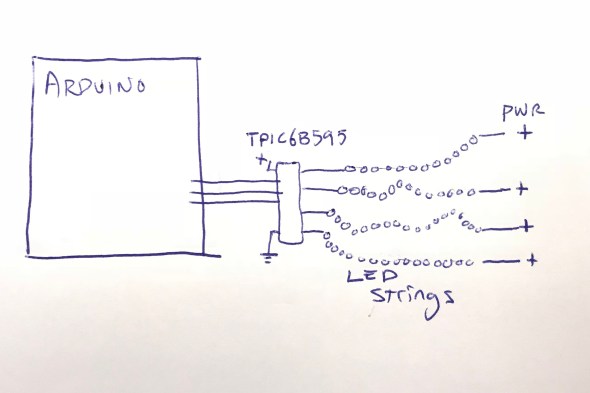
At this point the design for each umbrella is basically: Arduino + protoshield with four MOSFETS and four pull-down resistors. And of course four LED strings. I didn’t want to juggle the four separate MOSFETs, and I started wondering if there was some pre-packaged integrated circuit that basically had four MOSFETs inside it, so that I could reduce the part count from 4 MOSFETs down to one IC.
Looking around for a while, I came across the TPIC6B595, a “high power shift register”. They’re a bit like the popular 7HC595 shift register, with eight output pins, but they can drain “up to 150mA” per output pin. This might be the chip for me, I thought. But then, Hrm, I wondered, I wonder how much current I need for each LED string. I did some tests and found that each LED string could draw up to about 350mA. 350mA is far more than 150mA, so I didn’t think this chip was going work for me. On a lark, I decided to read the actual datasheet for the chip, from TI: http://www.ti.com/lit/ds/symlink/tpic6b595.pdf And look what we have here (highlighting is mine) …
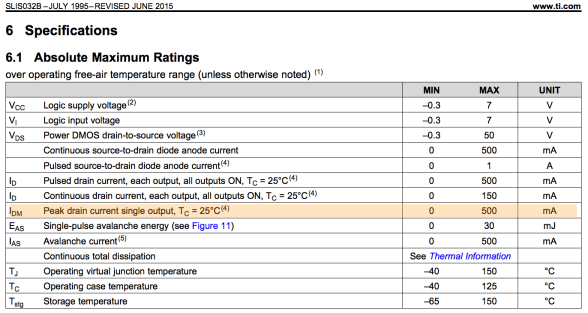
While the continuous drain current is 150mA per output pin, the peak drain current per pin is 500mA! And 500mA is greater than the 350mA that I need to flash the LED strings on for a few instants! Maybe this was the chip for me after all. I ordered one to test. Well, I actually ordered two, because electronics tend to not bounce back well from being tested with current levels above their ratings.
The chip arrived, and I wired it up, found some Arduino code to drive it, and lo and behold, it worked! In fact, I was able to hook up all four LED strings to the TPIC6B595 chip, and light them all up brightly (and briefly!) with no detectable overheating of the chip. I did note that the datasheet said that the whole chip could only handle one Amp (1000mA) of current. If I lit up all four LED strings at 350mA each, that would be 1400mA, more than the rated maximum current of the chip.
But again I wondered: OK, so it’s rated to handle 1000mA total. But what happens if I pulse 1400mA through it for one tenth (1/10th) of a second? Does it instantly blow up? Does it self-limit the current to 1000mA? Does it shut down and need to be powered off to reset it? Again, I decided to try it. The answer: it did not shut down, or need to be reset, or instantly blow up. In fact, it seemed perfectly happy to deliver 1400mA of current, as long as it was for short pulses, with cool-down periods between them. I decided to go forward with this, and see how far I could get. One chip, no discrete MOSFETs, and no pull-down resistors! If it worked, I liked this a lot.
Here’s where I was:
Flashdance (What A Feeling)
At this point I had a setup where I could drive all four LED strings from my Arduino code, as long as I didn’t run them all at full-blast all the time. In fact, I had to be mindful to keep the overall power level low, even if sometimes I spiked it up above the rated power level for TPIC6B595 chip, and above the standard continuous power level for the LED strings.
I spent a few hours studying ultra-slow-motion videos of lightning strikes, like this one:
After watching them over and over, I wrote and tested and refined some code that I thought created the same kind of visual impression, while also being mindful of the power envelope that I wanted to stay within. Once I had the code put together, I noticed that it was actually pretty small: compiled the code size was just about 3K, and it used less than 100 bytes of SRAM for global data. The small code and data size were hardly surprising in retrospect; in a sense, all that it did was flash four output values. I’d used FastLED’s math functions, which tend to be compact, including FastLED’s random number generator for the timing of the flashes. FastLED’s random number generator (well, pseudo-random number generator) is significantly more compact than the default Arduino random functions, which also helped reduce the code size.
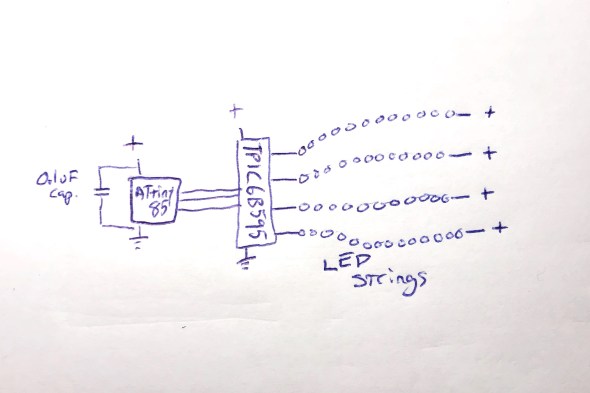
The small code size started me thinking: if I only need this tiny program, and this tiny amount of data, maybe instead of a full-blown Arduino board, I could just get away with a ‘bare’ ATtiny85 microcontroller. I knew that people did that, but I’d never done it. Luckily, there’s good documentation about how to wire up an ATtiny for programming, and good Arduino IDE support. https://github.com/SpenceKonde/ATTinyCore I decided to give this a try. I ordered a few ATtiny85s ($2.80 each) and the required (0.1uF) decoupling capacitors ($0.22 each). I used a special $15 ATtiny programmer to help simplify the programming process; I wanted to streamline the exploration of the ATtiny85 option as much as possible for myself.
When the ATtiny85s arrived, it took me a little while to get it all figured out: burning the bootloader onto the chips, and then compiling and loading my code. My original code used the Arduino SPI library to communicate with the TPIC6B595, but the ATtiny85 doesn’t have a true SPI library, so I had to adapt my code (and my head) a little bit. Also, I had written an interrupt handler routine to provide PWM dimming of the LED strips, but my code had used the TimerOne library, which is not officially supported on the ATtiny85, so I had to find an ATtiny-patched version of the library and switch to use that. https://github.com/StoykoDimitrov/TimerOne Also, due to the slower clock speed (8MHz vs standard Arduino’s 16Mhz) I had to halve the interrupt rate that I was using for my PWM support. But eventually, I got it all breadboarded up and wired and programmed, and it worked!
Here’s where I was at that point: no Arduino board, no loose MOSFETs, no pull-down resistors, no current-limiting resistors:
Everything worked great, until it didn’t
Everything worked great, even when I switched from a plug-in power supply to battery power… and then it started not working. It would start up fine, and ‘rumble’ some dim lights with no trouble, and even show the first few medium-bright lightning strikes. But on the fourth lightning strike, an extra-bright set of flashes, it would lock up. It always locked up on the fourth flash, which was always extra-bright, because the random number generator that the code used to sequence the ‘random’ flashes was, in fact, completely deterministic. Even though it might not seem that way to the casual observer, the same pattern of flashes always occurred, and the fourth one was always extra-bright, and that kept killing the microcontroller.
Based on my previous experience with battery-powered microcontroller-driven projects with lots of LEDs, I had a hunch, which turned out to be right: when the LEDs all flashed on brightly, the drain on the batteries from the bright LEDs caused an inverse voltage spike – a voltage dip. The voltage dipped too low, just for an instant, and the microcontroller locked up.
I thought about how I might isolate the microcontroller’s power from the sudden spike/dip from the LEDs flashing on full brightness. I could, of course, just reduce the maximum brightness of the LED strings, but this was a project for Burning Man, and I’m pretty sure that “reduce brightness” isn’t one of the ten principles. All I needed to do was power the microcontroller for a very short time, to bridge it across the dip caused by a very bright flash. I decided to try an experiment: I replaced the 0.1uF ‘decoupling’ capacitor ($0.22) next to the ATtiny85 with a capacitor with 10,000 times the power capacity: a 1000uF electrolytic capacitor ($1.22). My theory was that even when the LEDs spiked up in brightness, the new 1000uF capacitor would continue to provide just enough smooth power to the microcontroller it to keep running correctly. And it worked: even when bright flashes hit the LED strings, the microcontroller kept chugging along. Here’s where I was:
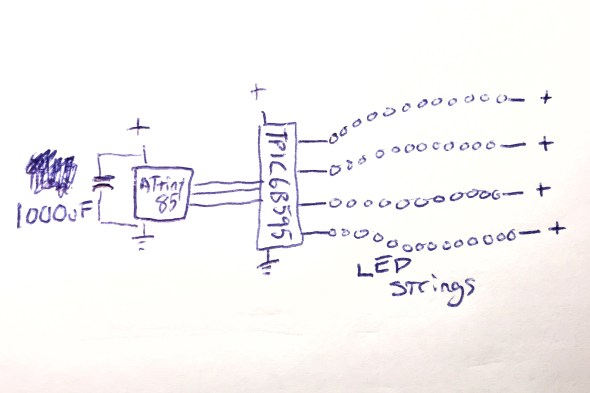
And this worked perfectly.
Now all I had to do was figure out how I was going to power this whole thing when it was mounted up inside an umbrella.
Hello Power My Old Friend
As I have written about before (see Cautionary Tales of Power), power is always a real pain in the grounding strap. Here were the choices that I was thinking about:
- 3xAA: this would be 4.5 volts on fresh batteries, and about 3.9 volts on ‘dead’ batteries. The microcontroller would probably work okay, and the LEDs would probably be okay, but I sort of felt like a 3xAA battery pack would be a little bit bulky and heavy. This was my ’emergency fallback’ plan.
- 4xAA: 6.0v on fresh batteries, 5.2v on ‘dead’ ones. I would have to use a voltage regulator, or a buck converter to drop the voltage down to the 4.5 – 5.0v range that I wanted. Plus a 4xAA battery pack would be even bulkier and heavier than the 3xAA pack above.
- Lithium Ion rechargeable battery pack: 3.7v when fully charged, 3.0v when empty. I’d probably want a boost converter to get up into the 4.5-5.0v range that I wanted. I love rechargeable batteries in general, but in the middle of the desert, there’s something to be said for being able to just eject a set of dead AAs, and drop in a fresh set. Using a lithium battery pack would make that much harder. Related options I thought about : standard 18650 cells, and also LiFePO4 cells.
- 2xAA + boost converter: this was what I really wanted to do. I wanted to use the DFRobot “AA Boost” module, which holds two AA batteries (very firmly), has a built-in on/off switch, and a boost converter which produces 5v output. It even has a “low battery” warning LED. The whole module costs $5.90 in quantity 1, and I’ve used them many times very successfully. https://www.dfrobot.com/product-991.html
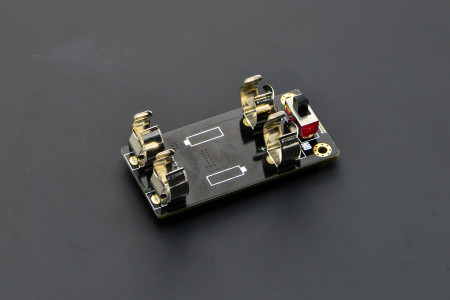
I already had some of these 2xAA+boost modules on hand, and was about ready to go forward with this plan when I spotted this in the DFRobot description. Note the current limit on the updated “V2” version of this module:
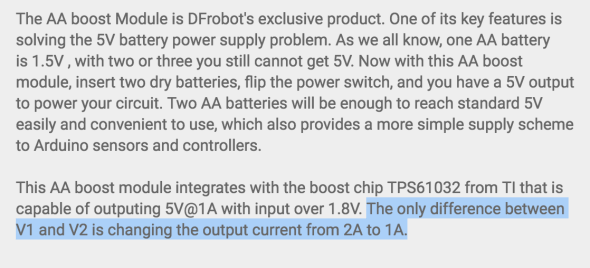
The maximum output current from this module was now just one amp. Not two, but one. One amp = 1000mA. And you may remember that the maximum power draw from the LED strings when they’re all fully lit, for a split second, is 1400mA total. And the 1400mA that we need is more than the maximum power that this module can provide.
Or… is it?
I looked up the TI TPS61032 boost chip that DFRobot uses in their boost module, and found the data sheet. http://www.ti.com/lit/ds/symlink/tps61032.pdf And while it definitely describes the chip as a “boost converter with 1000 mA current output”, look what it says in the highlighted (by me) portion of the datasheet:
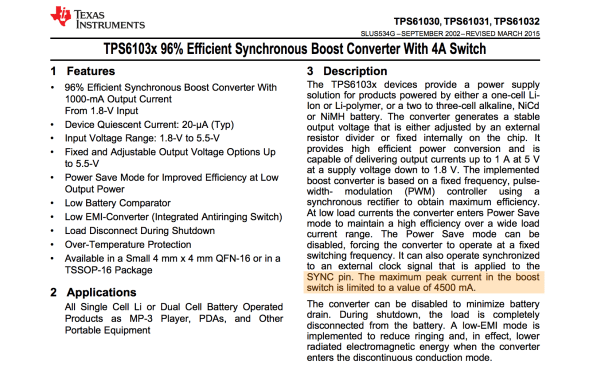
And with that datasheet in hand, I decided to do the same thing that I’d done twice before on this project: try it, and see if the components can operate over and above their advertised ‘continuous’ ratings for brief periods, with cool-down rest periods between. And the answer? Yep, short bursts above the ‘continuous’ rating seemed to work fine!
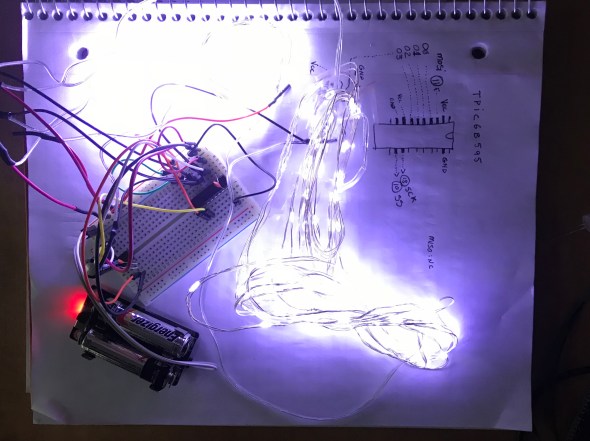
I had had a battery-life goal for the umbrellas: I wanted them to be able to run, at Burning Man, from dusk to dawn (12 hours) on one set of AA batteries. Once I had the design all wired up with the DFRobot AA boost module, I popped in a fresh set of AAs, turned it on, and went to bed. Not only was it still running the next morning, it continued to run for over 48 hours continuously, and it might have run longer, but I had to get back to work on it, so I turned it off. Next I had to figure out what I was going to do about a circuit board.
The Chairman of the Board
I’ve never designed a custom printed circuit board before by myself, and I really wanted to do that for this project. Now that the total part count for each board was down to just three (the ATtiny85, the TPIC6B595, and the 1000uF capacitor!) it seemed like a great first project for me. However, time before Burning Man was getting a little tight, and I looked around for other options that might be faster and designing a custom board, and having it manufactured for me.
Over on Tindie, I found a great little ATtiny85 Project Board for $1.75. https://www.tindie.com/products/DrAzzy/attiny85-project-board/
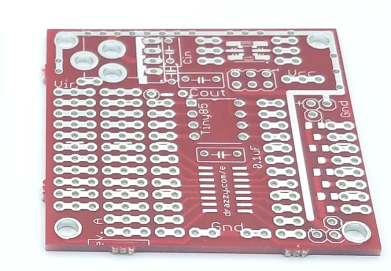
These little boards had: space for the ATtiny85, space for the 20-pin DIP TPIC6B595, and even a spot for the capacitor. I picked up some of these boards, added sockets for the DIP chips, seven jumper wires to inter-connect the two chips together correctly, attached some multiconductor connectors for the LED strings and power, and poof! Just look at that neat, tidy little red board there!
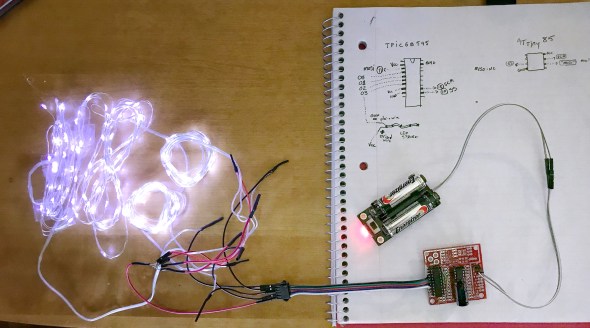
With all this ready to go, Sianna, Dean, and I worked out how we wanted the LED strings attached to the five-pin connectors. Sianna and Dean worked madly and mightily sewing the lights into the umbrellas, while I went into production mode, and made five more complete sets of boards and battery packs. If we’d been making more than six boards, I would have done a custom PCB for sure. Getting all those jumper wires right was my least favorite part of this project, but eventually it started going faster, and then they were all done!
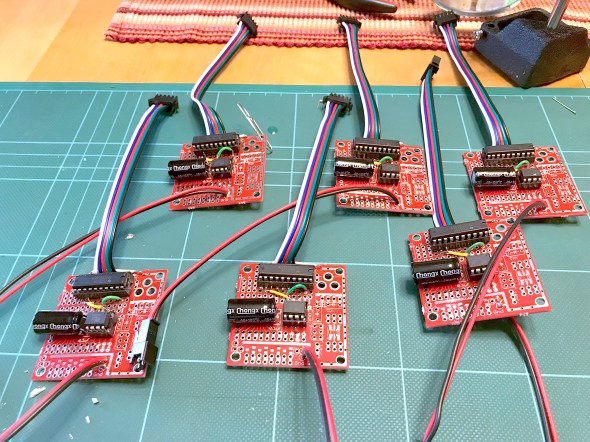
To this day, I’m still pretty proud of the three-component controller boards, and the development path that got me here.
Putting it all together
Sianna and Dean did a tremendous amount of work sewing all the LED strings into six large white umbrellas. When the first one was all put together, it was time for the first visual test. Full disclosure here: the umbrellas do not make thunder noises; the thunder noises in the following two video clips were ‘added in post’. We had thought about what it would take to make really good thunder noises, and the short answer was: a really big power supply (read: a heavy battery) and a really big (read: heavy) speaker — neither of which was going to integrate well with a umbrella intended to be carried in one hand. So: no audio. You just have to imagine the thunder noises, or, in this case, you can listen to the ones I dubbed into the video.
So here was Stormbrella #1, sitting on the couch.
And then came the whole collection, Stormbrellas #1 through #6, scattered across the living room.
For reasons of time and technology, the six of them are not wirelessly synchronized with each other, but other than that, these were just what we hoped. Sianna and Dean took a bunch of them out to Burning Man, where the umbrellas flashed their lightning, and fought mightily with the high winds in the Black Rock desert. Some of the stormbrellas even lived to return home and tell the tale of their adventures, and their victory.
Epilogue: A Halloween Thunderstorm
For Halloween, the kiddo and I always liked to decorate the front yard of our house with a big theme, like turning the house into a castle, or a discotheque, or an aquarium. And that year, we made the front yard into a thunderstorm. We set up a big sound system to play thunder, programmed flash strobes to light up the front of the whole house, and all of the stormbrellas on stands, giving lightning and umbrella vibes at the same time. Also I put a sprinkler on top of the house so that it was actually raining the tiniest bit, completely with a baffle to keep the actual front walkway up to the house — and the trick-or-treaters — dry. The overall immersive effect was great, and the stormbrellas rode again!
I still have the stormbrellas, and sometimes when it’s a rainy night out, I carry one of them as I walk, happy and dry underneath as the lightning I made flashes overhead.
Giving the Gift of Receiving
Posted: June 29, 2020 Filed under: Art, Getting A Clue, Pearls of Folksy Wisdom, Reflections, That Totally Worked | Tags: burning man, gift economy, gifting, gifts, giving, pineapple Leave a commentWhen you’re a little kid, the proverb “It is better to give than to receive” sounds like nonsense grown-up talk; most little kids would rather get a toy than give one away. But here’s a story about giving and receiving that shows what the proverb is really trying to express.
In 2010, I went to Burning Man with a bunch of friends. My friend Debby and I were walking around the city there, checking out all the art projects, and Saturday afternoon, after we’d all been living in the desert for a week, we came across a Wishing Well.

Here’s how the Wishing Well worked: you could make a wish, or you could grant a wish. To make a wish, write your wish on a rock (provided), along with your name and where you were camping. To grant a wish, rummage around through the stones that other people had written their wishes on, and see if there are any wishes you can grant. If so, take the stone with you, go find the person who wished on it, and make their wish come true.
I decided to make a wish. I wrote on a stone that I wished for a trinket to bring home to my daughter. I added my name, camp location, and tossed it in the Wishing Well.
While I was doing this, my friend Debby was rummaging around in the wishes that other people had tossed in the well. She held up a few stones that said all sorts of predictable things, and then held up a stone that said that “Dave” at such-and-such a camp was wishing for “fresh pineapple”. The entire population of the city had been camping in the desert for a week, and fresh fruit was an exotic wish indeed. But then Debby said, “I’ve got one.”
“You’ve got one what? A pineapple?”, I asked laughingly.
“Yes. A whole fresh pineapple. I have one. It’s been packed in ice all week, in a cooler, back at our camp.”
I was incredulous. “What were you going to do with your pineapple? Do you have a plan for it??”
“No”, she said, “I didn’t have a plan. It just seemed like a good thing to have.”
“Well, do you think we should bring it to ‘Dave’, and grant his wish?!?”
“Definitely,” Debby said.

So we took Dave’s wishing stone, went back to our camp, dug the whole, entire fresh pineapple out from the cooler, and set off to find Dave. Black Rock City (Burning Man) is never really entirely organized. In 2010, the population was over 50,000 people, and even though we had an approximate address of where to find ‘Dave’, Debby and I had to wander around quite a bit, and ask a lot of people for directions and clues before we triangulated on Dave’s camp.
When we found the right camp, we started asking “Does anyone here know Dave? Is Dave here?” After a few minutes, Dave poked his head out of a tent and said “Who are you? Why are you looking for me?”
We said, “We’re here from the Wishing Well. Are you the person who wished for fresh pineapple?”
“Yes? Yes…” he said starting to choke up, disbelieving, and getting emotional. “Yes, I did wish for that, but I thought it was impossible… oh my god…”
We handed the fresh pineapple, still cool from the ice, to Dave, who took it. He stared at it as if it weren’t real, as if none of this was really even happening. He broke out in tears of joy, hugging first the pineapple, then us, then the pineapple again. Debby and I told him to enjoy it, and we went on our way, grinning and laughing.
The next day, someone I didn’t know stopped by our camp, asking “Is Mark here? Does anyone know Mark?” I said “I’m Mark”, and they handed me a little hand-made necklace with the Burning Man logo on it, and said “This is for you to bring home to your daughter; I found your wish in the wishing well. I made this necklace, and I want you to bring it to her!” I gave a big smile and a big thank you, and a hug, and tucked the necklace away somewhere safe for my trip home.
Later, I was reflecting on these two experiences: receiving the thing that I had wished for, and giving someone else what they had wished for. It was exceedingly clear to me which had been more rewarding to me. While I did like receiving the necklace to bring home, granting Dave’s wish for pineapple had made me feel absolutely wonderful inside, and that feeling still stays with me today. So, I thought, I guess it really is better to give than to receive.
The more I thought about it, the more I came to realize that the real gift had been the one that Dave gave to me and Debby: by asking for something, Dave had given us the chance to give it to him, and then to feel wonderful about it. It’s the same gift that I gave the necklace artist by asking for a trinket to take home: a chance to do something nice for someone and feel wonderful about it.
I think about this story when people offer “Is there anything I can do to help? Is there anything I can bring you?” My first impulse is often to say “No thank you, I’m all set”, because I don’t want to impose on them. But then I think that maybe a better answer is to say “Why yes, actually, there is one small thing that would be nice…”, because then I am giving them the gift of being able to do something nice for someone, and to feel good about it. It’s “giving the gift of receiving”.
Sometimes, by asking for something, we can make other people happier, and that seems worth doing. Someone’s got to toss their wishes into the well, so other people can grant them.

Travel Tips for Venturing OUT of Black Rock City
Posted: September 3, 2012 Filed under: Explorations, How-to, Pearls of Folksy Wisdom | Tags: black rock city, burning man, clothes, clothing, default world, exit greeters, fire, money, travel, wall country 2 CommentsSo! You’ve decided to take a trip away from Black Rock City! Here are some tips to keep in mind when traveling away from Home:
Clothing: Make sure to bring enough clothes so that everyone in your group can have some. Among other things, will save you all time later since you won’t have to keep switching.

Money: Do you remember when you were a child, collecting bits of money here and there, slowly saving up for that one thing you really wanted? Well, money here works the same way, except that you may have to break open your piggy bank a little bit more often. If it helps, think of every shop, store, restaurant, gas station, bar, and mall that you see as if they were “Arctica”, and what they’re all selling is basically just ice: cool, and maybe useful, but ultimately fleeting and ephemeral. ‘Nuff said.


Bacon: BACON IS EXACTLY THE SAME EVERYWHERE, THANK $%!*&@# GOD.
Returning Home After Your Trip: After you’ve had an exciting jaunt out and about, it’s always good to come back Home, to be with your family and your loved ones. Have a wonderful trip, and we’ll see you when you get Home again.

Yours in flame-
-Mark
 blog.kriegsman.org